Monday, July 23, 2012

Programming WCF Security - One

After years of stories of viruses, stolen personal information & DOS (Denial of Service) attacks, it’s clear that security is important for every application...in our discussion we'll describe Windows Communication Foundation (WCF) security features and how to use them to help secure messages..
What are the core security features that WCF addresses?
There are four core security features that WCF addresses:
1) Confidentiality: This feature ensures that information does not go in to the wrong hands when it travels from the client to the server or vica versa.
2) Integrity: This feature ensures that the receiver of the message gets the same information that the sender sent without any data tampering.
3) Authentication: This feature verifies who the sender is and who the receiver is.
4) Authorization: This feature verifies whether the user is authorized to perform the action they are requesting from the application.
Security Infrastructure...
Let's try to understand how security at Transport & Message Layer can prevent unauthorized viewing and tampering with message when it travels from the client to the server or vica versa. & Implementation of user level security: Authentication and Authorization. In This Blog (Programming WCF Security - I). We will discuss Transport Level Security. Message Level Security ,Authentication and Authorization we'll cover in next.
Transport Level Security...
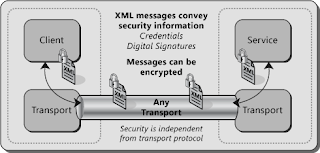
In WCF, the secure transports available for use are HTTP, Transmission Control Protocol (TCP)& Microsoft Message Queuing ( MSMQ ). For a transport to be secure, all communications that take place across the channel must be encrypted, Contrast this with Message Level security, which would encrypt only message component of communication.
In WCF, much about transport layer security is automatically handled or Abstracted to developers, We just have to implement some configuration details then rest will be handheld by WCF itself. A Number of benefits accrue by Transport layer security such as:
  1. Protection from sniffing network traffic , to obtain sensitive information
  2. Protection from Phishing attacks 
  3. Protection from message alteration when it travels from the client to the server or vica versa.
  4. Protection from Reply attacks
 Because Integrity is provided by ensuring that the Encryption Key is shared between only the two parties involved in communication. Privacy is guaranteed through the Encryption process, Mutual authentication of sender and receiver is provided because the credentials are encrypted as part of message...
Transport level security is directly related to the binding we are using, with one exception BasicHttpBinding, all the binding available for WCF include a default security mode... Even we can configure BasicHttpBinding for transport security either in code or via configuration...In configuration file add a security element to the BasicHttpBinding element as follows:

<basicHttpBinding>
    <binding>
      <security mode="None|Transport|Message|TransportWithMessageCredential|TransportCredentialOnly">
            <transport clientCredentialType="None|Basic|Digest|Ntlm|Windows"
             proxyCredentialType="None|Basic|Digest|Ntlm|Windows" realm="string" >
                <extendedProtectionPolicy
                     policyEnforcement="Never|WhenSupported|Always"
                     protectionScenario="TransportSelected|TrustedProxy">
                    <customServiceNames></customServiceNames>
                        </extendedProtectionPolicy>
            </transport>
        </security>
    </binding>
</basicHttpBinding>

 Because the binding uses HTTP as underlying protocol, the request will occur over an SSL-secured connection. In same way we can configure rest of the available bindings also for more details please visit MSDN

Courtesy: Random Web Images, Microsoft .NET 3.5 WCF Book, Several online resources 


Friday, July 13, 2012

WCF Extensibility….

The Windows Communication Foundation (WCF) application model is designed to solve the greater part of the communication requirements of any distributed application. But there are always scenarios that the default application model and system-provided implementations do not support. Reasons we can go for extension Parameter Inspection, Message Formatting, Message Inspection, Logging and so on… we can add as many reasons we want this list is also extendable as per requirement… J  In This topic I’ll try to outlines the various areas of extension let’s start by visiting The WCF Pipe line…
The WCF Pipeline…
If we have to brief what is WCF services we can say; Its WCF Messages traveling from server to client or client to server over The WCF Pipeline.

WCF message is primarily represented in SOAP \ XML (WCF POX Messages…) format internally & they can be transferred over the stack in binary or JSON or Plain text format. We can extend WCF Behaviors at service / endpoint / contract / operations. Interface exposed are as follows

1)       IServiceBehavior     3)  IContractBehavior

2)       IEndpointBehavior  4) IOperationBehavior

I’ll show example of Implementation of these Interface while Implementing Message Inspector. Let’s visits Messages Inspectors …

Messages Inspectors
Message Inspectors are most used extension in WCF, they allow inspect, modify, logging, Custom Authentication, Tweaking or replace some message elements in both incoming & out going messages. At Service side Message Inspectors are implemented using IDispatchMessageInspector interface which consist followings
  • AfterReciveRequest
  • BeforeSendReply
Message Inspectors are extended as end point behaviors 
Public void ApplyDispatchBehavior(ContractDescription contractDescription, ServiceEndpoint endpoint, DispatchRuntime dispatchRuntime)    {
        dispatchRuntime.MessageInspectors.Add(new MyInspector());
    }
At Client side Message Inspectors are implemented using IClientMessageInspector interface which consist followings
  • BeforeSendRequest
  • AfterReciveReply
It’s added as end point behaviors 
Public void ApplyClientBehavior(ContractDescription contractDescription, ServiceEndpoint endpoint, ClientRuntime clientRuntime)    {
        clientRuntime.MessageInspectors.Add(new MyInspector());
    }
Implementation of Message Inspector: - (C# Code Sample)
Okay let’s implement Message Inspector end to end... Following is an example of a service-side Message Inspector used to output to the Console any received and sent message:
public class ConsoleOutputMessageInspector : IDispatchMessageInspector
{
    public object AfterReceiveRequest(ref Message request, IClientChannel channel, InstanceContext instanceContext)
    {
        MessageBuffer buffer = request.CreateBufferedCopy(Int32.MaxValue);
        request = buffer.CreateMessage();
        Console.WriteLine("Received:\n{0}", buffer.CreateMessage().ToString());
        return null;
    }
    public void BeforeSendReply(ref Message reply, object correlationState)
    {
        MessageBuffer buffer = reply.CreateBufferedCopy(Int32.MaxValue);
        reply = buffer.CreateMessage();
        Console.WriteLine("Sending:\n{0}", buffer.CreateMessage().ToString());
    }
} 
In order to configure this message inspector we can extend end point Behavior as follows…
public class ConsoleOutputBehavior : IEndpointBehavior
{
    public void AddBindingParameters(ServiceEndpoint endpoint, 
            BindingParameterCollection bindingParameters)
    {
    }
 
    public void ApplyClientBehavior(ServiceEndpoint endpoint, 
              ClientRuntime clientRuntime)
    {
        throw new Exception("Behavior not supported on the consumer side!");
    }
 
    public void ApplyDispatchBehavior(ServiceEndpoint endpoint, 
                EndpointDispatcher endpointDispatcher)
    {
        ConsoleOutputMessageInspector inspector = new ConsoleOutputMessageInspector();
        endpointDispatcher.DispatchRuntime.MessageInspectors.Add(inspector);
    }
 
    public void Validate(ServiceEndpoint endpoint)
    {
    }
}
As you can see I implement the IEndpointBehavior interface, which defines three methods (AddBindingParameter, ApplyClientBehavior, and ApplyDispatchBehavior). The one I'm interested on is the ApplyDispatchBehavior that relates to the service-side. This method receives a parameter of type EndpointDispatcher that allows adding custom Message Inspectors instance to the service dispatching environment. Because we're defining an Endpoint Behavior, this behavior affects a single endpoint of a service. To map the behavior to the service endpoint we can use a custom configuration element in the configuration file of the service host. Otherwise we could apply the behavior directly through the Service Host instance. In this sample I used a custom configuration element. To do that we need a custom type describing the configuration element…It is a type inherited from BehaviorExtensionElement, like the following one:
public class ConsoleOutputBehaviorExtensionElement : BehaviorExtensionElement
{
    protected override object CreateBehavior()
    {
        return new ConsoleOutputBehavior();
    }
 
    public override Type BehaviorType
    {
        get
        {
            return typeof(ConsoleOutputBehavior);
        }
    }
} 
 
The previously declared extension element can be used in the .config file of the service host application as follows :  
<system.serviceModel>
        <services>
            <service name="Service1">
                <endpoint
 
                    behaviorConfiguration="ExntBehavior"
                    address="
http://localhost:8000/ Service1"
                    binding="wsHttpBinding" bindingConfiguration="WsHttpBinding"
                    contract="IService1" />
            </service>   
 
        </services>
        <extensions>
            <behaviorExtensions>
                <add name="consoleOutputBehavior" type="ConsoleOutputBehaviorExtensionElement,Extensions, Version=1.0.0.0, Culture=neutral, PublicKeyToken=null" />
            </behaviorExtensions>
        </extensions>
        <behaviors>
            <endpointBehaviors>
                <behavior name="ExntBehavior">
                    <consoleOutputBehavior />
                </behavior>
            </endpointBehaviors>
        </behaviors>
        <bindings>
            <wsHttpBinding>
                <binding name="WsHttpBinding">
                    <security mode="None" />
                </binding>
            </wsHttpBinding>
        </bindings>
</system.serviceModel>
So far you have seen how to define custom Message Inspector and how to map it to a single endpoint, using and Endpoint Behavior…
Parameter Inspectors
Parameter Inspectors are similar to Message Inspector but they used CLR object rather than Message object, they allow inspect, modify operations inputs & outputs, Logging & Parameter validation but we can’t modify return value. Parameter Inspectors are implemented using IParameterInspector interface which consist followings
  • BeforeCall
  • AfterCall

Implementation of Parameter Inspectors : - (C# Code Sample)
 Public class NameValidationParameterInspector : IParameterInspector
   {
       readonly int _nameParamIndex;
       const string NameFormat ="[a-zA-Z]";
  
       public NameValidationParameterInspector() : this(0) { }

       public NameValidationParameterInspector(int nameParamIndex)
       {
           _nameParamIndex = nameParamIndex;
       }


       public object BeforeCall(string operationName, object[] inputs)
       {  
           string nameParam = inputs[_nameParamIndex] as string;

           if (nameParam != null)
               if (!Regex.IsMatch(
                   nameParam, NameFormat, RegexOptions.None))
                   throw new FaultException(
                       "Invalid name. Only alphabetical character");
           return null;
       }

       public void AfterCall(string operationName, object[] outputs, object returnValue, object correlationState){}
}
Rest we can decide on which Behaviour we want to extend it and then we can modify our configuration, or service attributes as per need.. Implementation would be same as we have done in implementation of Message Inspector….
Though you might not directly need to extend the functionality of WCF it’s nice to know that it’s possible and extremely flexible. The scenario for extending WCF’s functionality might come in handy when you need to apply instrumentation. E.g.: Parameter and Message Inspectors might come in handy for logging every incoming and outgoing parameter and message…
   
Courtesy: Random Web Images, Microsoft .NET 3.5 WCF Book, Several online resources

Saturday, April 23, 2011

Consuming WCF Service

There is no hassle for use of The Windows Communication Foundation..list is endless but to name few of the places where it can be used is ...
  • business-to-business (B2B),
  • business-to-consumer (B2C),
  • Interoperability with other platforms,
  • messaging for any kind of communication

  • Most web service platforms provide us mechanism for creating an object that can be used to communicate with the service... those objects are called proxies.WCF provides us several mechanisms for creating proxy objects that can be used to communicate with service.

    Generating Proxy classes from service metadata:-

    There are two ways to create proxies using metadata.
    1.Using Svcutil.exe
    2.Using Visual Studio to Generate proxy
    .Net 3.0 Framework provides a command line utility called svcutil that we can use for generating proxies;location of this utility is...

    ..\Program Files\Microsoft SDKs\Windows\v6.0\Bin

    The following is an example how you might use the utility...

    Svcutil http://localhost:8080/WeatherService.svc /out: ServiceProxy.cs /config: app.config

    Couple of things about command example
    1. C# is default language for other language you need to provide language option
    2. Out is for output option and config is for configuration file generation. Other options can be found at following location

    http://msdn.microsoft.com/en-us/library/aa347733.aspx


    Visual studio to generate Proxy:
    In visual studio you can add service reference by right clicking project node in solution explorer and choosing Add service reference...


    [Service Reference:-1]
    In the resulting dialog box enter the endpoint address of service endpoint and click Go to discover to browse for available service... click ok to generate proxy


    [Service Reference:-2]
    Manually creating Proxy class:-
    Opposed to having a tool to generate a proxy class we can manually define our own proxy class using ‘ClientBase’ as base class tools also use this call behind the scenes...
    e.g.

    [ServiceContract]
    Interface IWeatherService
    {
    [OperationContract]
    CurrentTemperatureResponse GetCurrentTemperature ();
    }

    We could manually define proxy class based on that contract as follows...

    Public Class WeatherServiceProxy : ClientBase< IWeatherService >, IWeatherService
    {
    Public WeatherServiceProxy (Binding binding, EndpointAddress epAddr)
    {
    }
    Public WeatherServiceProxy (string endpointConfName)
    : Base (endpointConfName)
    {
    }
    Public CurrentTemperatureResponse GetCurrentTemperature ()
    {
    return this.Channel.GetCurrentTemperature ();
    }

    }

    Dynamically Creating Proxy:-
    In few cases we do not need to have proxy class explicitly define anywhere because WCF provides the ChannelFactory class as a mean of creating proxy objects based on Service Contract alone. The following code shows how this would be done....

    Binding objBinding = new WSHttpBinding ();
    ChannelFactory< IWeatherService > Factory =;
    Factory = new ChannelFactory< IWeatherService >
    (objBinding, “http://localhost:8080/WeatherService.svc”);
    Try
    {
    IWeatherService Proxy = Factory.CreateChannel ();
    CurrentTemperatureResponse argRes = new CurrentTemperatureResponse ();
    argRes = Proxy. GetCurrentTemperature ();
    }
    Catch (System.ServiceModel.FaultException ex)
    {
    Messagebox.show (ex.FaultReason);
    }
    So above are the ways to create proxy object we use them according to projects need.
    Best Practices:-
    One of the principles of service oriented development client should only on service’s schema and not any on service’s class... So the best practice to consume service is through service’s metadata... if manually or dynamically creating service proxy then we need to have access to WCF contracts; in that case Contracts binary files have to be shard by client and service and we should avoid to form this type of strict coupling....